NextLearn
A multi-tenant LMS for coaching institutes.
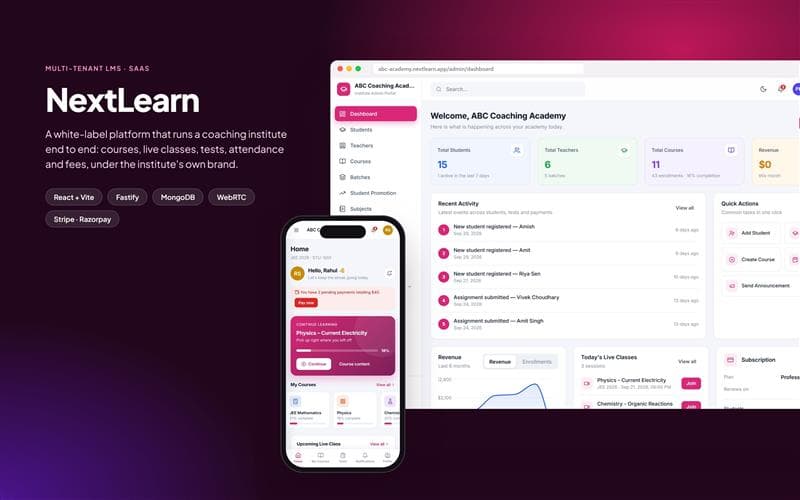
- Full-stack developer — platform architecture, role portals and learning workflows
- 7 months
- 2025
- Live
Overview
NextLearn is a SaaS learning platform for coaching institutes, with separate branded portals for each institute and role-specific experiences for super admins, admins, teachers, students and parents.
Problem
What was actually wrong.
Most coaching institutes were running on a mix of WhatsApp groups, spreadsheets, manual attendance and fragmented payment links. They needed a single system for their own brand that could handle teaching, tests, attendance, fees and communication without custom engineering per institute.
Goals
- Give each institute its own branded learning environment
- Support multiple roles and permissions from one platform
- Run live classes, assessments and fee collection inside one flow
- Keep the product mobile-friendly and practical for day-to-day academic operations
Solution
The approach taken.
I built a multi-tenant LMS with role-based portals and institute-level data isolation, combining course delivery, live teaching, assessments, attendance, fee collection and communication in one product. Super admins manage the platform and subscriptions, while each institute runs its own branded portal from the same system.
Architecture
Multi-tenant product model
Each institute gets its own branding, content set and data boundary. The platform is shared, but the tenant layer keeps every academy isolated and independently manageable.
Role-based portal structure
Admins, teachers, students and parents each get a dedicated experience with the features they actually need, while the super-admin layer manages subscription, institutes and platform-level configuration.
Teaching and assessment flows
Courses are structured around subjects and chapters, while live classroom tools, tests, assignments and results keep the learning lifecycle in one consistent system.
Operational tools
Attendance, QR-based ID checks, fee tracking and communication are all built into the product so the institute does not need separate workflows outside the platform.
Technologies
Frontend
- React
- Vite
- Responsive UI
- Light / dark mode
Backend
- Fastify
- Node.js
- JWT
- Rate limiting
Data & realtime
- MongoDB
- Redis
- WebRTC
- Server-Sent Events
Payments & ops
- Stripe
- Razorpay
- Docker
- AWS S3
Key features
Institute-level white-labeling
Every institute gets its own portal branding, content and data boundary, managed from a super-admin layer that keeps the platform reusable across multiple academies.
Course and lesson management
Instructors create structured course content using videos, PDFs, YouTube resources and quizzes, with lesson tracking and progress visibility for students.
Live classroom and collaboration
The built-in classroom includes live video, whiteboard, chat, polls and a transcript so teaching can happen inside the platform rather than through external tools.
Attendance and fee workflows
QR-based ID cards make attendance practical and trackable, while Stripe and Razorpay collection support dues, invoices and fee management in the same system.
Responsive multi-role experience
The platform is built to work well on mobile, not as a desktop-only admin app, which matters for students, teachers and parents who are often on the move.
Process
Understand
Mapped the coordination problems across institute operations: classes, communication, fees, attendance and student progress were all spread across separate tools.
Design
Structured the product around roles and institute-level data isolation so each portal felt premium and tailored while staying administrable from one platform.
Build
Implemented the LMS flows end to end: course admin, live classroom, tests, attendance, fee collection and communication for both the institute and its users.
Scale
Added multi-tenant structure, operational tooling and responsive UX so the product could serve many institutes without losing clarity or trust.
Screens
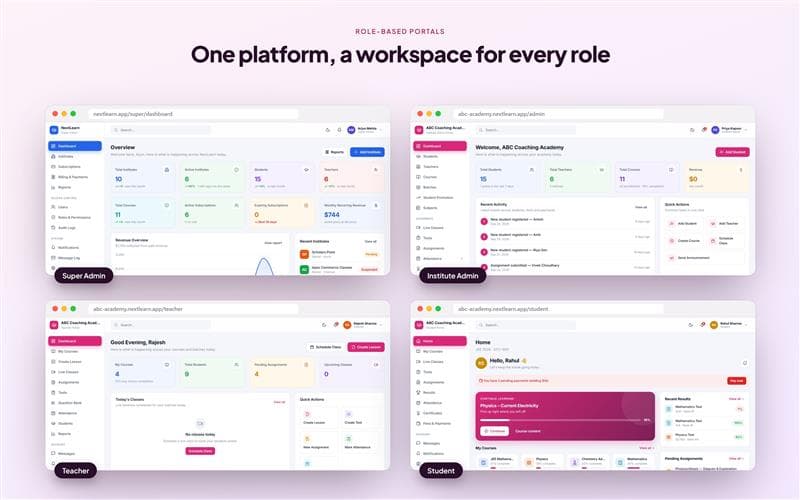
Role-based portals 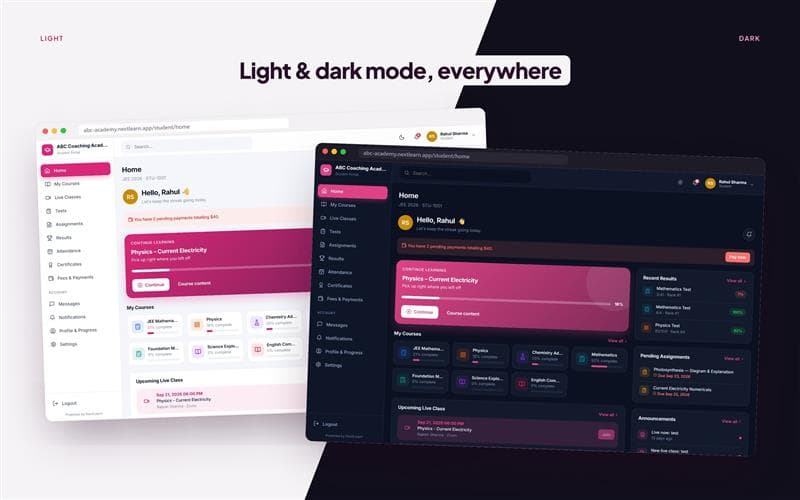
Light and dark mode 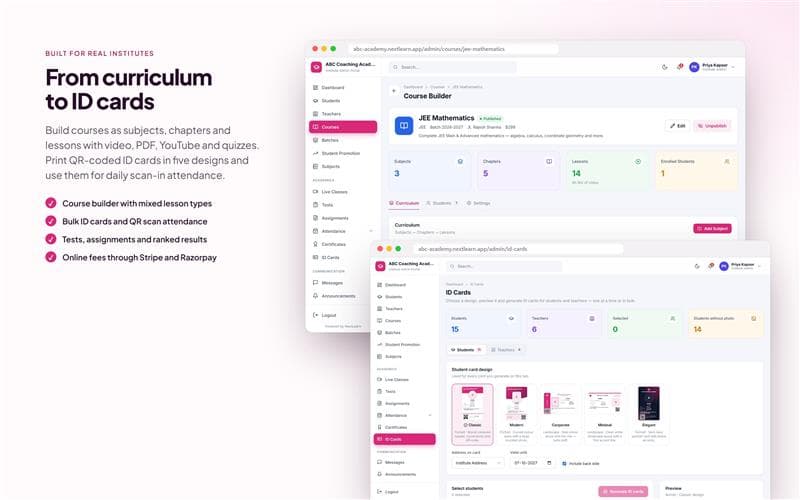
Course builder and attendance 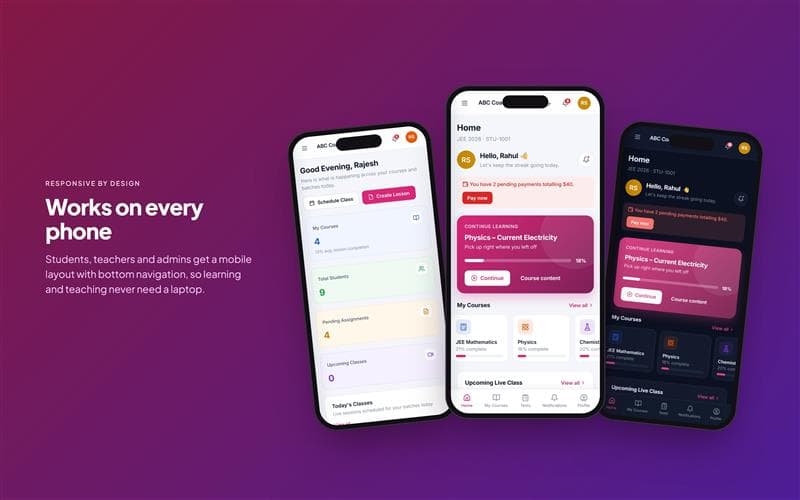
Mobile experience
Challenges
What went wrong first.
One product, many institutes
The platform needed shared infrastructure without shared data or branding. Multi-tenancy had to be real at the product and data-model level, not just cosmetic.
Role clarity without role sprawl
Super admin, admin, teacher, student and parent all needed their own experience, but the underlying workflows had to stay consistent and maintainable.
Operational software that still feels lightweight
The product had to support real academic operations and payment flows, but still feel clean enough to be used every day across phones and desktops.
Learnings
- A platform becomes trustworthy when each role sees the right version of the truth, not more features.
- Multi-tenant SaaS works best when branding and data isolation are treated as first-class product architecture, not a last-minute layer.
- The mobile experience is part of the product, not a secondary concern, when the users are students and teachers working in real classrooms.
Full-Stack Dating Platform: Web, Mobile & Admin
A full-stack dating platform for web, iOS/Android and admin, with swipe matching, real-time chat, map-based discovery and paid subscriptions.